The TCP/IP Stack: The Architecture of the Internet
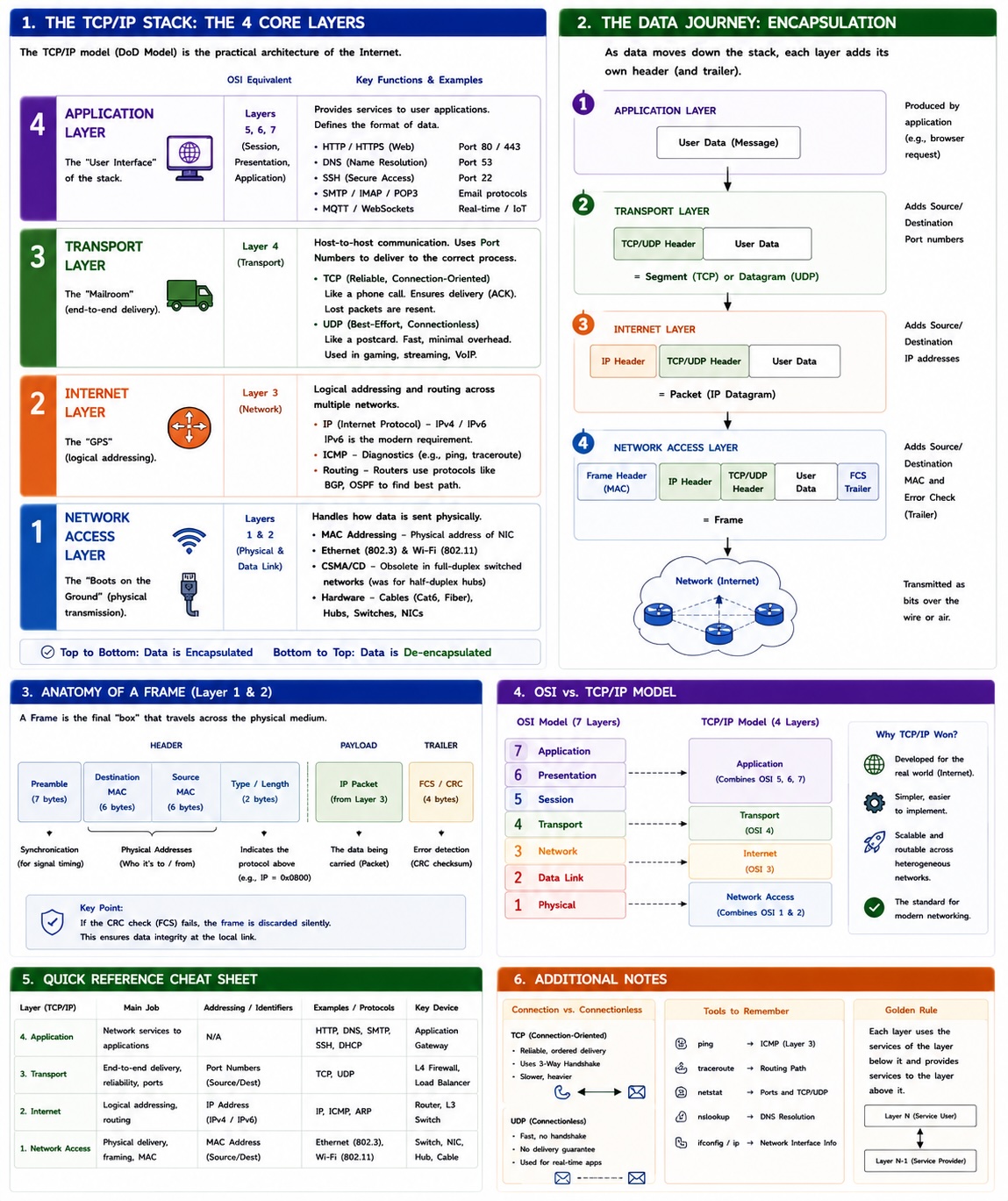
The TCP/IP Stack (also known as the Internet Protocol Suite) is the definitive set of rules that enables communication between computers globally. Unlike the theoretical 7-layer OSI model, TCP/IP was built for practical implementation and is the backbone of every "ping," "tweet," and "email" you send.
1. The Core Layers
The TCP/IP model typically consists of 4 layers. While some modern documentations split the bottom layer into "Data Link" and "Physical" (making it 5 layers), we will stick to the standard Department of Defense (DoD) 4-layer model.
I. Application Layer
OSI Equiv: Layers 5 (Session), 6 (Presentation), & 7 (Application)
This is the "User Interface" of the stack. It handles high-level protocols that applications use to communicate over a network. It doesn't care how the data gets there; it only cares about the format of the data.
- HTTP/HTTPS: The language of the web (Port 80/443).
- DNS: The internet's phonebook (Port 53).
- SSH: Secure remote access (Port 22).
- SMTP/IMAP/POP3: The trio that makes email work.
- MQTT/WebSockets: Modern standards for Real-time/IoT communication.
II. Transport Layer
OSI Equiv: Layer 4 (Transport)
The Transport layer is the "Mailroom." It handles host-to-host communication and ensures that data reaches the correct process on a computer using Port Numbers.
- TCP (Transmission Control Protocol): Connection-oriented. It’s like a phone call; you establish a connection, send data, and verify receipt (ACK). If a packet is lost, it is resent.
- UDP (User Datagram Protocol): Connectionless. It’s like a postcard; you send it and hope for the best. Used for gaming and streaming where speed beats perfect reliability.
III. Internet Layer
OSI Equiv: Layer 3 (Network)
The Internet layer is the "GPS." It is responsible for logical addressing (IP addresses) and routing packets across multiple networks.
- IP (Internet Protocol): The foundational protocol. IPv4 is standard, but IPv6 is the modern requirement to handle the explosion of internet-connected devices.
- ICMP: Used for diagnostics (e.g.,
ping). - Routing: Routers live here, using protocols like BGP to find the best path between networks.
IV. Network Access Layer
OSI Equiv: Layers 1 (Physical) & 2 (Data Link)
The "Boots on the Ground." This layer handles how data is physically sent as electrical signals, light pulses, or radio waves. It bridges the gap between software and hardware.
- MAC Addressing: Physical addresses unique to each Network Interface Card (NIC).
- Ethernet & Wi-Fi (802.11): The primary protocols used here.
- Correction on CSMA/CD: While historically important for "Half-Duplex" hubs, modern "Full-Duplex" switches have largely made collision detection (CSMA/CD) obsolete in wired networks.
- Hardware: Cables (Cat6, Fiber), Hubs, and Switches.
2. The Data Journey: Encapsulation
As data moves down the stack, each layer wraps the data from the previous layer with its own "envelope" containing metadata. This is called Encapsulation.
- Application Layer: Produces Data (or Message).
- Transport Layer: Adds a header (Source/Dest Ports) \(\rightarrow\) becomes a Segment (TCP) or Datagram (UDP).
- Internet Layer: Adds a header (Source/Dest IP) \(\rightarrow\) becomes a Packet.
- Network Access Layer: Adds a header (MAC addresses) and a trailer (Error checking) \(\rightarrow\) becomes a Frame.
3. Anatomy of a Frame
A Frame is the final "box" that travels across the wire or airwaves.
| Component | Description |
|---|---|
| Header | Contains Preamble (for sync), Source/Destination MAC addresses, and Type. |
| Payload | The IP Packet from the layer above. |
| Trailer | Contains the FCS (Frame Check Sequence)—a CRC checksum used to detect if data was corrupted during transmission. |