Containerizing an Application
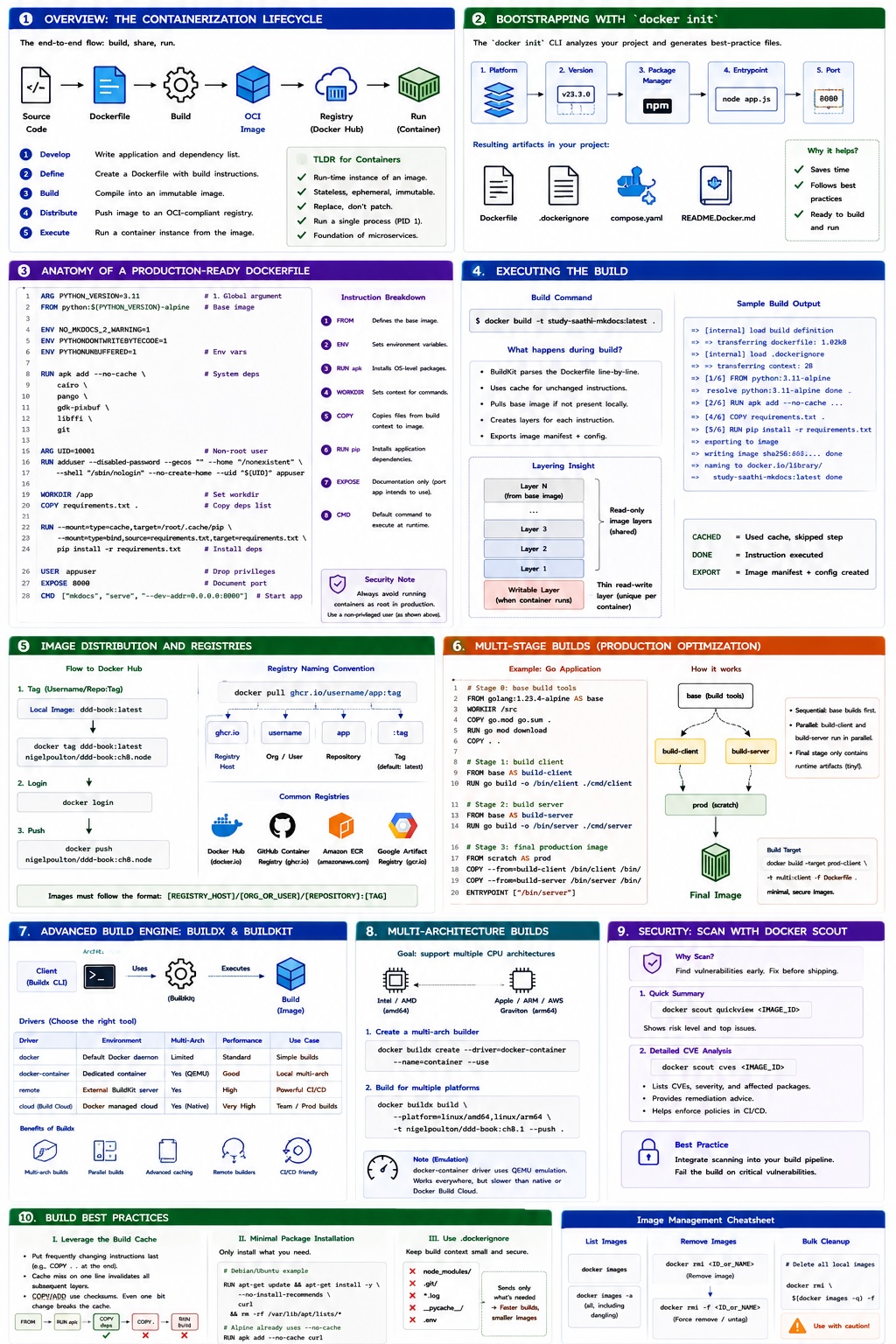
This guide covers the end-to-end process of transforming source code into a portable, secure, and production-ready container image. It is specifically designed to align with CKAD (Certified Kubernetes Application Developer) competencies.
1. Overview: The Containerization Lifecycle
Docker simplifies the lifecycle of an application through a standardized process often referred to as "build, share, run."
graph LR
    A[Source Code] --> B[Dockerfile]
    B --> C{Docker Build}
    C --> D[OCI Image]
    D --> E[Registry / Docker Hub]
    E --> F[Container Run]
The "TLDR" Process
- Develop: Write your application and define its dependency list (e.g.,
requirements.txt,package.json). - Define: Create a
Dockerfilecontaining instructions for the build engine. - Build: Compile the application and its environment into an Immutable Image.
- Distribute: Push the image to an OCI-compliant registry (optional but standard).
- Execute: Start a container instance from the image.
2. Bootstrapping with docker init
Modern Docker versions (Desktop 4.27.0+) provide a powerful utility to jumpstart containerization while following industry best practices.
Using the Init CLI
The docker init command analyzes your build context and generates necessary templates automatically.
Interactive Walkthrough
- Platform: Select your language (e.g., Node, Python, Go).
- Version: Choose the specific runtime version (e.g., Node 23.3.0).
- Package Manager: (e.g., npm, pip, go mod).
- Entrypoint: Define the start command (e.g.,
node app.js). - Port: Define the listener (e.g., 8080).
Resulting Artifacts:
Dockerfile: Optimized for the chosen language..dockerignore: Prevents sensitive or heavy files (likenode_modulesor.git) from entering the build context.compose.yaml: Ready-to-use local orchestration.README.Docker.md: Documentation for the generated files.
3. Anatomy of a Production-Ready Dockerfile
A well-crafted Dockerfile is efficient, secure, and utilizes layer caching. Below is an annotated example of an MkDocs (Python) application.
# 1. Define global arguments
ARG PYTHON_VERSION=3.11
# Use a lightweight Python alpine image as the base
FROM python:${PYTHON_VERSION}-alpine

# 2. Environment Configuration
# Disable MkDocs 2.0 warnings for future-proofing
ENV NO_MKDOCS_2_WARNING=1
# Prevent Python from writing .pyc files
ENV PYTHONDONTWRITEBYTECODE=1
# Ensure logs are emitted immediately (unbuffered)
ENV PYTHONUNBUFFERED=1

# 3. Install System Dependencies
# --no-cache keeps the image small by skipping index storage
RUN apk add --no-cache \
    cairo \
    pango \
    gdk-pixbuf \
    libffi \
    git

# 4. Security: Implement Non-Privileged User
# CKAD Note: Always avoid running containers as root in production.
ARG UID=10001
RUN adduser \
    --disabled-password \
    --gecos "" \
    --home "/nonexistent" \
    --shell "/sbin/nologin" \
    --no-create-home \
    --uid "${UID}" \
    appuser

# 5. Build Logic
WORKDIR /app
COPY requirements.txt .

# Leverage BuildKit cache mounts and bind mounts for high performance
RUN --mount=type=cache,target=/root/.cache/pip \
    --mount=type=bind,source=requirements.txt,target=requirements.txt \
    pip install -r requirements.txt

# 6. Runtime Configuration
USER appuser
EXPOSE 8000
CMD ["mkdocs", "serve", "--dev-addr=0.0.0.0:8000"]
Instruction Breakdown
| Line Group | Instruction | Purpose |
|---|---|---|
| 1 | FROM | Defines the base image. Pulls from Docker Hub if not local. |
| 2 | ENV | Sets persistent environment variables within the image. |
| 3 | RUN apk | Executes shell commands to install OS-level dependencies. |
| 4 | WORKDIR | Sets the context for all subsequent RUN, CMD, and COPY steps. |
| 5 | COPY | Transfers files from the local Build Context to the image filesystem. |
| 6 | RUN pip | Installs application-level dependencies. |
| 7 | EXPOSE | Documentation only: Informs users which port the app intends to use. |
| 8 | CMD | Defines the default command to execute when the container starts. |
4. Executing the Build
Standard Build Command
Use the -t flag to "tag" your image with a human-readable name.
Deep Dive: The Build Output & Layering
When you build an image, BuildKit parses the file line-by-line.
- Layer Count: You may notice more layers in
RootFSthan instructions in your Dockerfile. For example, a 6-line Dockerfile might result in 9 layers. This happens because the Base Image (e.g.,python:alpine) already contains its own set of layers. - CACHED: If an instruction hasn't changed since the last build, Docker uses the local cache to skip the step.
- Exporting: The final stage creates an Image Manifest (JSON) and an Image Config that describes the stack.
5. Image Distribution and Registries
Pushing to Docker Hub
To share an image, it must follow a specific naming convention: DockerID/Repository:Tag.
If you built an image as ddd-book:latest, you must re-tag it with your username.
6. Multi-Stage Builds (Production Optimization)
Multi-stage builds allow you to use a "Heavy" image for building (with compilers) and a "Slim" image for the final production environment.
CKAD Tip: Minimal Images
Production images should only contain runtime artifacts. This reduces the Attack Surface and bandwidth usage.
# Stage 0: Base build tools
FROM golang:1.23.4-alpine AS base
WORKDIR /src
COPY go.mod go.sum .
RUN go mod download
COPY . .

# Stage 1: Build Client (Parallelizable)
FROM base AS build-client
RUN go build -o /bin/client ./cmd/client

# Stage 2: Build Server (Parallelizable)
FROM base AS build-server
RUN go build -o /bin/server ./cmd/server

# Stage 3: Final Production Image
FROM scratch AS prod
COPY --from=build-client /bin/client /bin/
COPY --from=build-server /bin/server /bin/
ENTRYPOINT [ "/bin/server" ]
Stages vs. Parallelism
- Sequential: The builder runs
basefirst. - Parallel:
build-clientandbuild-servercan run simultaneously because they both depend onbasebut not on each other. - Scratch: Using
FROM scratchcreates a zero-byte base, the smallest possible starting point for statically compiled binaries.
Targeting Specific Stages
You can stop the build at a specific stage using --target:
this can be used build multiple images from a single Dockerfile.
7. Advanced Build Engine: Buildx & BuildKit
Architecture
- Client (Buildx): CLI plugin supporting advanced features.
- Server (BuildKit): The execution engine.
Builders and Drivers
You can create isolated BuildKit instances (Builders) using different drivers.
| Driver | Environment | Performance |
|---|---|---|
| docker | Default daemon | Standard. |
| docker-container | Dedicated container | Supports Multi-Arch via QEMU emulation. |
| remote | External server | Highest performance, offloads CPU/RAM from dev machine. |
| Build Cloud | Docker Managed | Native hardware speeds, shared team cache. |
8. Multi-Architecture Builds
To support both Intel (amd64) and Apple Silicon/Graviton (arm64), use the --platform flag.
# 1. Create a builder that supports multi-arch
docker buildx create --driver=docker-container --name=container --use

# 2. Build for multiple platforms
docker buildx build \
  --platform=linux/amd64,linux/arm64 \
  -t nigelpoulton/ddd-book:ch8.1 --push .
Emulation Note
The docker-container driver uses QEMU to emulate target hardware. While highly compatible, it is significantly slower than native builds or Docker Build Cloud.
9. Security: Vulnerability Scanning with Docker Scout
Scanning should be an integrated part of your build pipeline.
Quickview and CVE Analysis
Use docker scout to analyze an image for known vulnerabilities before deployment.
# Get a summary
docker scout quickview <IMAGE_ID>

# Get detailed CVE info and remediation advice
docker scout cves <IMAGE_ID>
10. Build Best Practices
I. Leverage the Build Cache
- Order Matters: Instructions that change frequently (like
COPY . .) should go at the end. - Cache Invalidation: If one line results in a "cache miss," all subsequent lines are re-executed.
- Checksums: For
COPYandADD, Docker performs a checksum on the content. If a single bit inrequirements.txtchanges, the cache is invalidated for that step.
II. Minimal Package Installation
Avoid installing recommended or suggested packages that aren't strictly necessary.
# Example: Debian/Ubuntu
RUN apt-get update && apt-get install -y --no-install-recommends \
    curl \
    && rm -rf /var/lib/apt/lists/*
III. Managing Images
- Remove Image:
docker rmi <ID>(Removes the image and all unshared layer data). - Force Remove:
docker rmi -f(Use with caution; this untags images in use, leaving "dangling" images). - Bulk Cleanup: