🐳 Docker Foundation: Concepts & Architecture
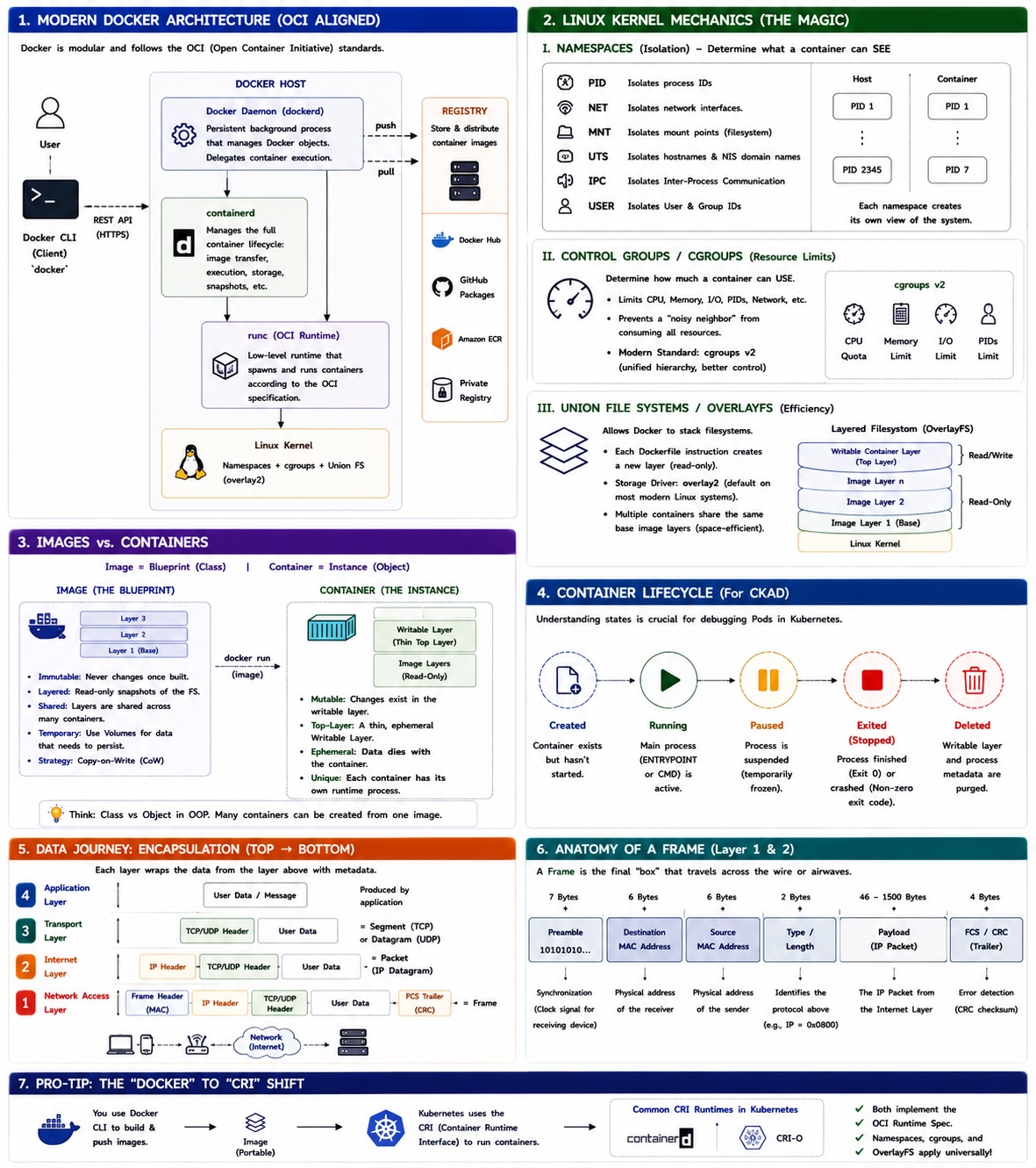
These notes provide a high-fidelity foundation for container orchestration, specifically tailored for CKAD (Certified Kubernetes Application Developer) preparation.
The Docker platform is a neatly packaged collection of technologies for creating, managing, and orchestrating containers. Docker, Inc. is the company that created the Docker platform.
There are two major parts to the Docker platform:
- The CLI (client)
- The engine (server)
The client and engine can be on the same host or connected over the network.
The Open Container Initiative (OCI)
The Open Container Initiative (OCI) is a governance council responsible for low-level container-related standards. The OCI maintains three standards called specs:
- The image-spec
- The runtime-spec
- The distribution-spec
🏗️ 1. Modern Docker Architecture
Docker has evolved from a monolithic daemon into a modular, decoupled set of tools. It follows the OCI (Open Container Initiative) standards to ensure interoperability.
The Component Breakdown
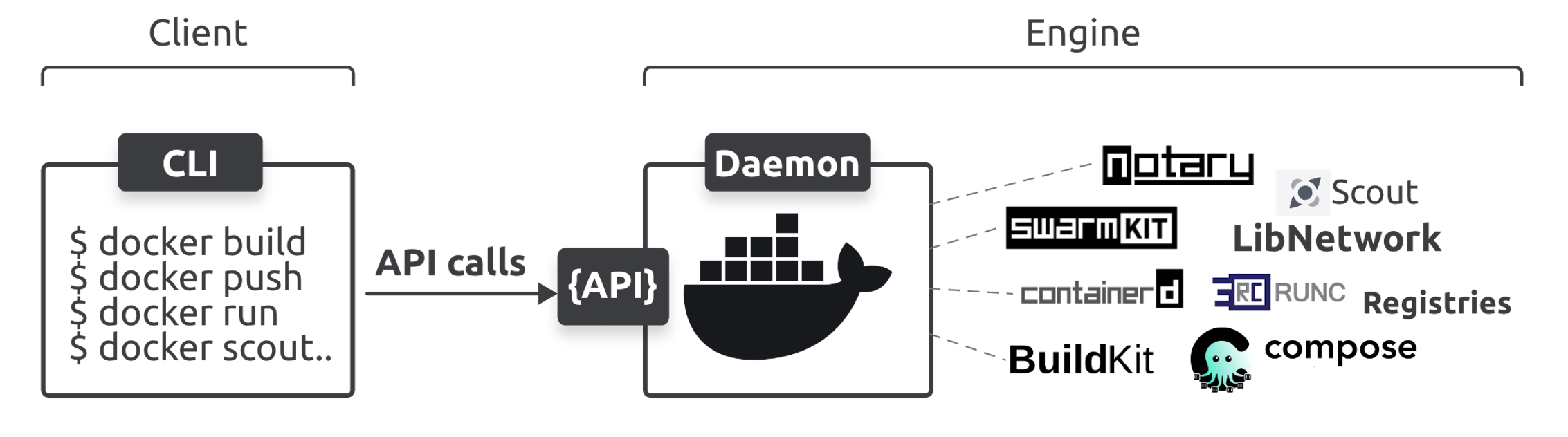
- Docker Client: The CLI (
docker) that converts your commands into REST API calls. - Docker Daemon (
dockerd): The persistent background process that manages Docker objects. It no longer runs containers directly; it delegates to the runtime. - containerd: A CNCF graduated project. It manages the full container lifecycle: image transfer, execution, and storage.
- runc: The "low-level" runtime. It is a lightweight CLI tool for spawning and running containers according to the OCI specification.
- Registry: A centralized or distributed store (Docker Hub, GitHub Packages, Amazon ECR) where images are pushed and pulled.
- BuildKit: The Docker builder (BuildKit) creates OCI compliant-images
⚙️ 2. The Linux Kernel Mechanics (The Magic)
Docker is often called "chroot on steroids." It relies on three primary kernel features to create the illusion of a standalone OS:
I. Namespaces (Isolation)
Namespaces determine what a container can see.
- PID: Isolates process IDs (Container PID 1 is not Host PID 1).
- NET: Isolates network interfaces.
- MNT: Isolates mount points (Filesystem).
- UTS: Isolates hostnames and NIS domain names.
- IPC: Isolates Inter-Process Communication resources.
- USER: Isolates User and Group IDs.
II. Control Groups / cgroups (Resource Limits)
cgroups determine how much a container can use.
- They prevent a "noisy neighbor" container from consuming all CPU, RAM, or I/O bandwidth.
- Modern Note: Linux now uses cgroups v2, which provides a unified hierarchy and better resource management for modern workloads.
III. Union File Systems / OverlayFS (Efficiency)
This allows Docker to "stack" filesystems.
- Layering: Each instruction in a
Dockerfilecreates a new layer. - Storage Driver: Most modern systems use
overlay2. It allows multiple containers to share the same base image layers, saving massive amounts of disk space.
📦 3. Images vs. Containers
The relationship between an image and a container is the same as the relationship between a Class and an Instance in OOP.
| Feature | Image (The Blueprint) | Container (The Instance) |
|---|---|---|
| State | Immutable: It never changes once built. | Mutable: Changes exist in the writable layer. |
| Storage | Layered: Read-only snapshots of the FS. | Top-Layer: A thin, ephemeral "Writable Layer." |
| Persistence | Temporary. Use Volumes for data. | Ephemeral. Data dies with the container. |
| Strategy | Copy-on-Write (CoW): Shared layers. | Unique runtime process. |
🔄 4. The Container Lifecycle (For CKAD)
Understanding the state of a container is vital for debugging Kubernetes Pods later:
- Created: The container exists but hasn't started.
- Running: The main process (
ENTRYPOINTorCMD) is active. - Paused: The process is suspended.
- Exited (Stopped): The process finished (Exit 0) or crashed (Non-zero exit).
- Deleted: The writable layer and the process metadata are purged.
💡 5. Pro-Tip: The "Docker" to "CRI" Shift
For the CKAD, remember that Kubernetes uses the CRI (Container Runtime Interface). While you might use Docker to build images, Kubernetes often uses containerd or CRI-O directly to run them. The knowledge of Namespaces and cgroups applies universally across all of them!